Automate Manual Data Entry With Bots Easy

There is nothing worse than relying on data that was manually entered by an overworked and likely underpaid individual. Anything typed by hand carries the risk of being inaccurate, incomplete, or both. Fortunately, given the rise of automation and bots, painstakingly copying data from a spreadsheet into an application is a thing of the past. The best part is that if you have a paid subscription to Microsoft Office 365, you likely already have a robust RPA (robotic process automation) solution at your disposal.
Before Automating Anything Do This
Before automating anything, you'll want to standardize your processes and data. You cannot tech your way out of a bad process. If your operating procedures aren't solid, automation will just allow you to make errors at a faster rate. This is of course not what you're looking for, so it's imperative that you clean house before opening your door to the robots. Here's my recommended approach to automation prep:
Standardize how you work: If one guy calculates potential revenue using an Excel formula and the other uses a physical calculator, you have a problem. The inputs need to be the same if you want the same outputs.
Make sure your SaaS provider is ok with bot use: There are some vendors that explicitly prohibit non-human use of their systems. Financial and Healthcare vendors in particular. While tools like UIPath, Microsoft Power Automate, and others may technically work, if a vendor discovers this they may terminate the account. So it's imperative that you check with the owner of your target system. It would be awful to fully invest in an RPA solution only to have it shut down at a moment's notice.
Decide what clean data looks like: Develop a prototype of what a perfect record looks like. This helps you detect anomalies and ensure the records are consistent across the board.
Of the three steps, the first one is going to be the most time consuming, particularly if you haven't been heavy on standard operating procedures (SOPs) in the past. But it's well worth the investment, even if you ultimately decide against going full force on with a bot army. Once you've got the preparation part settled, it's time to choose a tool. I've got some recommendations below based on your current tech stack/ecosystem:
Google Workspace
I use Google Workspace for my business, primarily because I've come to prefer Gemini for coding tasks over ChatGPT. For my fellow Googlers, the native automation tool here is AppSheet. This tool allows you to build applications and automations without writing code. It's commonly used to take data from a spreadsheet and move it elsewhere without human intervention. This is perfect for those looking to automate manual data entry.
It is, however, not as robust a solution as others. AppSheet is entirely web based, so if your target application does not have an API or web hook, it cannot be used to automate anything. As such, if you're dealing with a legacy application or one that simply doesn't provide you such access, you'll have to use a different tool.
Microsoft 365
I don't like Microsoft as much as Google but of the two, it has the superior bot software. Most subscriptions to Office 365 come with Microsoft Power Automate for web and desktop. If you decide to run an unattended bot, you will have to pay extra, however. But for most web based use cases, the license you currently have will suffice.
Either Microsoft or Google Workspace
UIPath is the most robust, complex RPA solution available, in my opinion. It is also, however, the most expensive and most complicated to use. And it's not a no-code solution as certain functions will require a bit of coding knowledge. You won't have to write thousands of lines of code but as is common with many low-code platforms, a little hacking is needed to unlock the platform's full potential.
Start With Simple Automations First
Here's a scenario involving three data entry clerks. All three collect data from emails and an ERP system. They then plug the data into a six mile long spreadsheet and upload the data into Salesforce. The entire process from start to finish takes each rep three hours each day. And since they are doing this manually while being responsible for other tasks, mistakes are happening. To remedy this, we'll build a simple yet powerful automation using Microsoft Power Automate.
-
Automate Data Extraction from Emails
Tool: Power Automate Cloud Flow
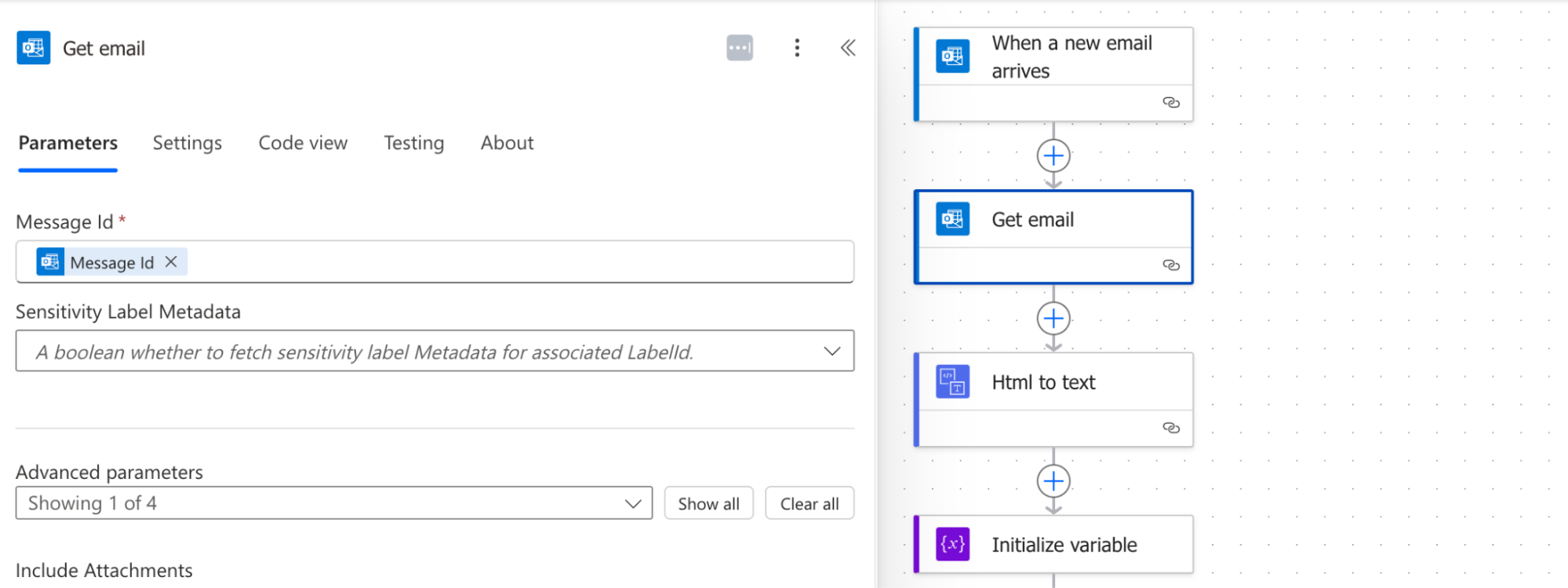
Trigger: When a new email arrives (e.g., in Outlook or Gmail, using the appropriate connector).
Action: Power Automate will analyze the email content and attachments.
If the data is in the email body, use built-in text parsing/AI Builder to extract the key fields.
If the data is in a structured attachment (like an Excel file), read the content of the file.
Storage: Send the newly harvested data to a temporary storage location (a SharePoint list or online Excel doc works fine here).
-
Automate Data Extraction from the ERP System
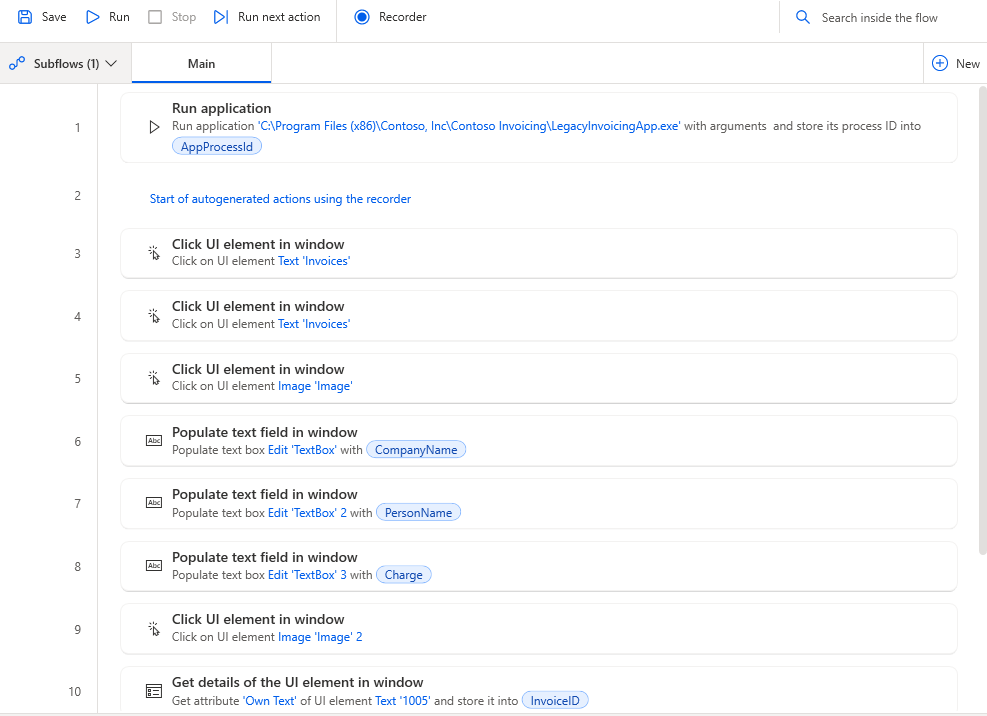
Tool: Power Automate Desktop Flow
Trigger: Set the Desktop flow to run on a daily schedule via a Cloud Flow trigger (an "unattended bot" would be required for a server to run this 24/7, which will cost extra $).
Action: Use UI/desktop automation features:
Log into the ERP system.
Navigate to the required data screens or reports.
Use UI selectors to read the data fields or trigger a report download (essentially have it do everything a human would do, which is why standardization is extremely important. A bot does not think independently and will only do what you tell it).
Storage: Append the extracted data to the temporary spreadsheet.
-
Standardize, Validate, and Upload to Salesforce
Tool: Power Automate Cloud Flow
Trigger: Run on a schedule (e.g., once a day after all extraction flows are complete) or immediately after a successful completion of the extraction flows.
Action (Data Prep): The flow would first check the master dataset for anomalies (remember you defined what anomalies were in your pre automation prep). It can use formulas or conditional checks to ensure data quality before upload.
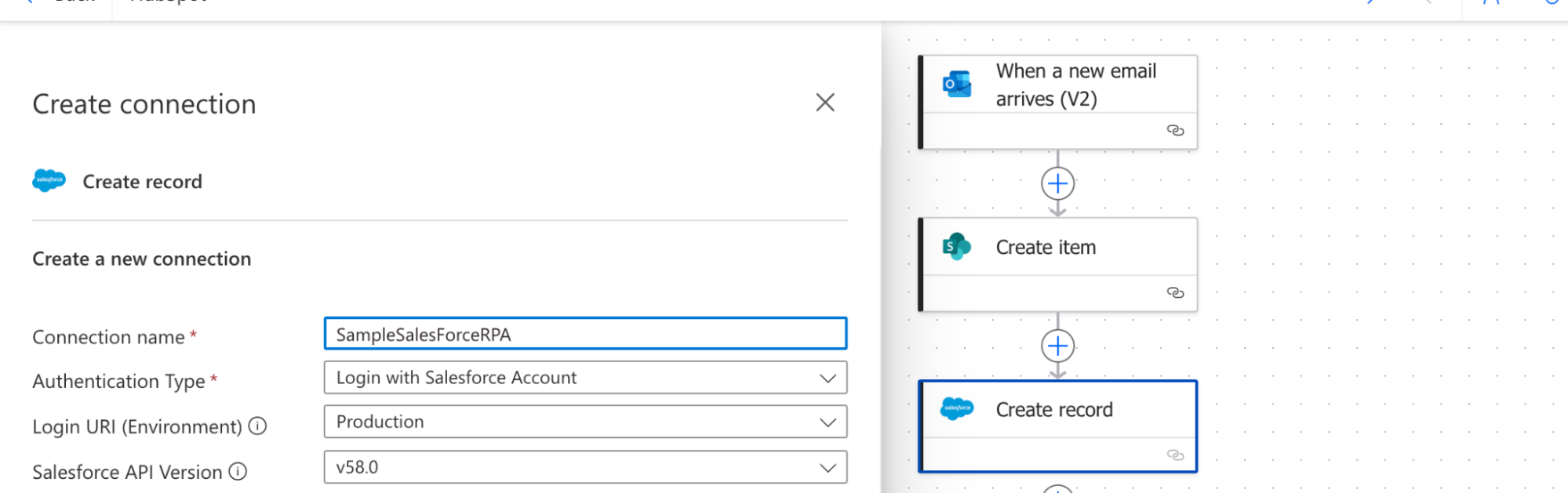
Action (Salesforce Integration): Use the Salesforce connector within Power Automate to perform the final upload.
Iterate through the clean records in the master storage.
For each record, use the Salesforce connector to create new records (contacts, deals, companies, etc.) or update existing ones based on a unique ID.
Final Step: Once the upload is complete, the flow should send a success/failure notification email to the relevant personnel (or log the activity) and clear the temporary master storage for the next run.
Automating Data Upload to Salesforce
Once both flows have fed enough data into the spreadsheet, it's time to post it into Salesforce.
Once the flows have completed, you should have a real life human go in and do some quality checks. Bots are great but things can happen that cause messy data to be uploaded. Monitor it closely for the first few weeks and take note of anything that deviates from your expectations. The most fragile part of this process is the ERP data extraction. Since we are heavily reliant on parts of the UI, and not using an API as we did with Salesforce, the slightest change can break things.
If the ERP vendor decides to make some UI tweaks and swap the first and last name fields, your automation will fail. Even seemingly minor changes to the system like renaming a field user_name to username can cause issues. As such, it's important to pay attention to any changes announced by software vendors. If possible, ask them specifically which areas of the application are changing so you can adapt your Power Automate flows accordingly.
Grab Some Caffeine, Your RPA Tool of Choice, and Start Automating
The best way to learn more about the myriad of automation tools is to build a few yourself. Breaking and fixing things is still the absolute best way to learn new technologies. Most of the RPA software makers provide free accounts and dev environments for you to try out their product before committing to an annual or monthly subscription. If you're looking for a cool project to try out for your maiden voyage into the realm of bots, check out my article on Syncing Content Between Sites With Power Automate. Finally, if you ever get stuck or want to work together on automating your CRM solution, I'm only a DM away on LinkedIn.

Posted by: Matt Irving on 12/16/2025